\[ \begin{align}\begin{aligned}\newcommand\blank{~\underline{\hspace{1.2cm}}~}\\% Bold symbols (vectors) \newcommand\bs[1]{\mathbf{#1}}\\% Differential \newcommand\dd[2][]{\mathrm{d}^{#1}{#2}} % use as \dd, \dd{x}, or \dd[2]{x}\\% Poor man's siunitx \newcommand\unit[1]{\mathrm{#1}} \newcommand\num[1]{#1} \newcommand\qty[2]{#1~\unit{#2}}\\\newcommand\per{/} \newcommand\squared{{}^2} \newcommand\cubed{{}^3} % % Scale \newcommand\milli{\unit{m}} \newcommand\centi{\unit{c}} \newcommand\kilo{\unit{k}} \newcommand\mega{\unit{M}} % % Percent \newcommand\percent{\unit{{\kern-4mu}\%}} % % Angle \newcommand\radian{\unit{rad}} \newcommand\degree{\unit{{\kern-4mu}^\circ}} % % Time \newcommand\second{\unit{s}} \newcommand\s{\second} \newcommand\minute{\unit{min}} \newcommand\hour{\unit{h}} % % Distance \newcommand\meter{\unit{m}} \newcommand\m{\meter} \newcommand\inch{\unit{in}} \newcommand\foot{\unit{ft}} % % Force \newcommand\newton{\unit{N}} \newcommand\kip{\unit{kip}} % kilopound in "freedom" units - edit made by Sri % % Mass \newcommand\gram{\unit{g}} \newcommand\g{\gram} \newcommand\kilogram{\unit{kg}} \newcommand\kg{\kilogram} \newcommand\grain{\unit{grain}} \newcommand\ounce{\unit{oz}} % % Temperature \newcommand\kelvin{\unit{K}} \newcommand\K{\kelvin} \newcommand\celsius{\unit{{}^\circ C}} \newcommand\C{\celsius} \newcommand\fahrenheit{\unit{{}^\circ F}} \newcommand\F{\fahrenheit} % % Area \newcommand\sqft{\unit{sq\,\foot}} % square foot % % Volume \newcommand\liter{\unit{L}} \newcommand\gallon{\unit{gal}} % % Frequency \newcommand\hertz{\unit{Hz}} \newcommand\rpm{\unit{rpm}} % % Voltage \newcommand\volt{\unit{V}} \newcommand\V{\volt} \newcommand\millivolt{\milli\volt} \newcommand\mV{\milli\volt} \newcommand\kilovolt{\kilo\volt} \newcommand\kV{\kilo\volt} % % Current \newcommand\ampere{\unit{A}} \newcommand\A{\ampere} \newcommand\milliampereA{\milli\ampere} \newcommand\mA{\milli\ampere} \newcommand\kiloampereA{\kilo\ampere} \newcommand\kA{\kilo\ampere} % % Resistance \newcommand\ohm{\Omega} \newcommand\milliohm{\milli\ohm} \newcommand\kiloohm{\kilo\ohm} % correct SI spelling \newcommand\kilohm{\kilo\ohm} % "American" spelling used in siunitx \newcommand\megaohm{\mega\ohm} % correct SI spelling \newcommand\megohm{\mega\ohm} % "American" spelling used in siunitx % % Capacitance \newcommand\farad{\unit{F}} \newcommand\F{\farad} \newcommand\microfarad{\micro\farad} \newcommand\muF{\micro\farad} % % Inductance \newcommand\henry{\unit{H}} \newcommand\H{\henry} \newcommand\millihenry{\milli\henry} \newcommand\mH{\milli\henry} % % Power \newcommand\watt{\unit{W}} \newcommand\W{\watt} \newcommand\milliwatt{\milli\watt} \newcommand\mW{\milli\watt} \newcommand\kilowatt{\kilo\watt} \newcommand\kW{\kilo\watt} % % Energy \newcommand\joule{\unit{J}} \newcommand\J{\joule} % % Composite units % % Torque \newcommand\ozin{\unit{\ounce}\,\unit{in}} \newcommand\newtonmeter{\unit{\newton\,\meter}} % % Pressure \newcommand\psf{\unit{psf}} % pounds per square foot \newcommand\pcf{\unit{pcf}} % pounds per cubic foot \newcommand\pascal{\unit{Pa}} \newcommand\Pa{\pascal} \newcommand\ksi{\unit{ksi}} % kilopound per square inch \newcommand\bar{\unit{bar}} \end{aligned}\end{align} \]

Jan 19, 2026 | 358 words | 4 min read

14.1.2. Task 0#

Learning Objectives#

Read external data, write to external files, and plot modified data in Python using subplots.

Task Instructions#

Before beginning this activity, read through the pre-class material, and completely watch the pre-class videos. In this task, you will be reading from and writing to simple CSV files and creating a figure containing two side-by-side plots in Python using matplotlib.

  1. Make a copy of the ENGR133_Python_Template.py Python template and rename the file to py4_pre_0_username.py

  2. Make sure to fill out all header information, including a short description of the code.

  3. Download the data set titled py4_pre_0_data.csv. Be sure to save this file under the same name in the same folder as your Python files (you may need to move it from your downloads). Remember that for your Python program to access this data file you must open the folder in your VS Code workspace.

  4. Create a program that does the following:

    1. Reads in the downloaded data. The columns in the CSV represent Day, Quantity Traded, and Price respectively.

    2. Calculates the Dollar Volume for each day. Dollar Volume is calculated as: \(\text{Dollar Volume} = \text{Quantity Traded} \times \text{Price}\)

    3. Exports the Day and calculated Dollar Volume data to a new CSV file under the title py4_pre_0_username.csv.

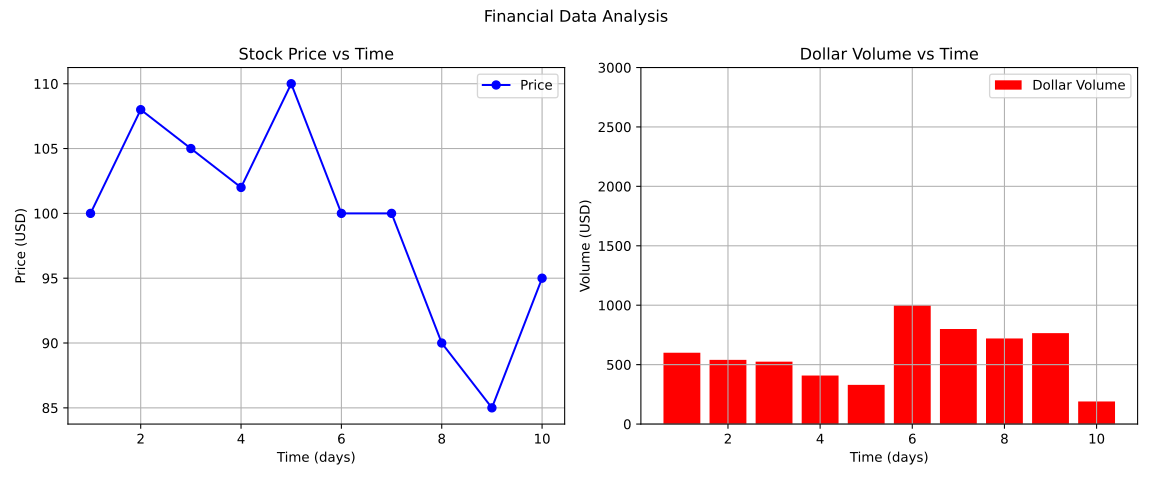
    4. Creates a matplotlib figure with two side-by-side subplots (1 row, 2 columns):

      • The left subplot should plot Price vs Time as a line plot with blue circular markers.

      • The right subplot should plot Dollar Volume vs Time as a red bar chart with the proper y-axis limits.

      • Each subplot should have appropriate titles, axis labels, grids, and legends.

      • The overall figure should have a super-title.

    5. Format the layout to ensure that titles and labels do not overlap (using tight_layout()).

    Note

    You may need to force the figure size to be (12, 5) to match the example output.

    You can find more information in the matplotlib documentation here.

  5. Save the code file as py4_pre_0_username.py and save the output file as noted in 4c.

Hint

To read in csv files and write to new csv files in Python, you can use the file I/O methods shown in the pre-class material.

Alternatively, you can use the csv module or pandas library to read from and write to CSV files. Here are some useful links:

Sample Output#

Case__py4_pre_0_plot.svg

Fig. 14.1 Case__py4_pre_0_plot.svg#

Table 14.2 Deliverables#

Deliverables

Description

py4_pre_0_username.py

Your completed Python code.

py4_pre_0_username.csv

Your modified CSV file.