
Apr 28, 2026 | 539 words | 5 min read
9.2.2. Task 2#
Learning Objectives#
In this task, you will practice using MS Excel for engineering calculations. You will gain proficiency in using cell referencing for calculations, organizing data effectively with descriptive variable names and appropriate units, and interpreting results to answer critical design and analysis questions.
Important
When organizing your work in MS Excel:
Use cell referencing to perform the calculations
Use descriptive variable names
Include column and row headings with units
Organize and format your work so it is easy to follow
Part A: Storage Tank Design#
Introduction#
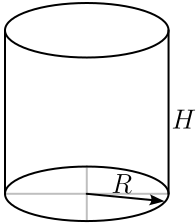
Fig. 9.5 Cylinder for Part A: Storage Tank Design.#
A team of engineers is designing a storage tank in a cylindrical shape. The total available surface area of the cylinder (\(A\)) is \(\qty{2000}{\sqft}\). The team’s objective is to make this cylinder hold the maximum possible volume. The dimensions for the cylinder are shown in Fig. 9.5.
Equations used:
Volume: \(V = \pi R^2 H\)
Surface area: \(A = 2 \pi R^2 + 2 \pi R H = \qty{2000}{\foot\squared}\)
Task Instructions#
Open the answer sheet
ex1_team_2a_teamnumber.xlsx. Save it with your team number replacingteamnumberin the file name.On the Input Section of the sheet, you will see possible radii of the storage tank. Under the Calculation Section, calculate the possible height \(H\) and volume \(V\) for each radius \(R\).
Use cell referencing to perform the calculations.
Organize and format your work, so it is easy to follow. Be sure to include units.
Copy the following questions into the Output Section of the spreadsheet and then add your answers.
Which combination of radius \(R\) and height \(H\) results in the largest volume \(V\)?
Are the dimensions from the previous question acceptable considering maximizing volume and transportation to a new site? Why or why not?
Save the
ex1_team_2a_teamnumber.xlsxfile as ex1_team_2a_teamnumber_values.pdf displaying the values and ex1_team_2a_teamnumber_formulas.pdf displaying the formula.
Part B: Soil Stress Calculations#
Introduction#
Karl Terzaghi was a Czechoslovakian geotechnical engineer who lived between \(1883\) and \(1963\). He is known today as the grandfather of soil mechanics. One of his many significant contributions includes the calculation of vertical stress in soil using the equation
where, \(\sigma\) is the vertical stress (\(\psf\)), \(\gamma\) is the soil unit weight (\(\pcf\)), and \(h\) is the depth below soil surface (\(\foot\)).
On a particular site, engineers find three types of soil:
Soil A: \(\gamma = \qty{115}{\pcf}\)
Soil B: \(\gamma = \qty{124}{\pcf}\)
Soil C: \(\gamma = \qty{140}{\pcf}\)
Task Instructions#
Open the answer sheet
ex1_team_2b_teamnumber.xlsx. Save it with your team number replacingteamnumberin the file name.Calculate the vertical stress at \(5\) foot intervals from \(\qty{5}{\foot}\) to \(\qty{40}{\foot}\) for each of the soil types listed above.
Copy the following questions into the Output Section of the spreadsheet and then add your answers.
A stress-measuring device is buried \(\qty{40}{\foot}\) under the surface. The maximum stress this device can stand is \(\qty{5,000}{\psf}\). In which type(s) of soil can this device be buried?
What percentage of stress values calculated for soil C are above \(\qty{5000}{\psf}\)?
Save the
ex1_team_2b_teamnumber.xlsxfile as ex1_team_2b_teamnumber_values.pdf displaying the values and ex1_team_2b_teamnumber_formulas.pdf displaying the formula.
Deliverables#
Each team member is expected to contribute to every team task.
You and your team members will be held responsible for all material.
All collaborators should be clearly listed, and their contributions are properly referenced.
One team member should upload all deliverables to Gradescope as a single submission.
Be sure to assign all team members to the submission.
For help with submitting team assignments, see Adding Team Members in Gradescope.
Deliverables |
Description |
|---|---|
ex1_team_2a_teamnumber_values.pdf |
PDF of your MS Excel document with values showing. |
ex1_team_2a_teamnumber_formulas.pdf |
PDF of your MS Excel document with formulas showing. |
ex1_team_2b_teamnumber_values.pdf |
PDF of your MS Excel document with values showing. |
ex1_team_2b_teamnumber_formulas.pdf |
PDF of your MS Excel document with formulas showing. |