\[ \begin{align}\begin{aligned}\newcommand\blank{~\underline{\hspace{1.2cm}}~}\\% Bold symbols (vectors)
\newcommand\bs[1]{\mathbf{#1}}\\% Differential
\newcommand\dd[2][]{\mathrm{d}^{#1}{#2}} % use as \dd, \dd{x}, or \dd[2]{x}\\% Poor man's siunitx
\newcommand\unit[1]{\mathrm{#1}}
\newcommand\num[1]{#1}
\newcommand\qty[2]{#1~\unit{#2}}\\\newcommand\per{/}
\newcommand\squared{{}^2}
\newcommand\cubed{{}^3}
%
% Scale
\newcommand\milli{\unit{m}}
\newcommand\centi{\unit{c}}
\newcommand\kilo{\unit{k}}
\newcommand\mega{\unit{M}}
%
% Percent
\newcommand\percent{\unit{{\kern-4mu}\%}}
%
% Angle
\newcommand\radian{\unit{rad}}
\newcommand\degree{\unit{{\kern-4mu}^\circ}}
%
% Time
\newcommand\second{\unit{s}}
\newcommand\s{\second}
\newcommand\minute{\unit{min}}
\newcommand\hour{\unit{h}}
%
% Distance
\newcommand\meter{\unit{m}}
\newcommand\m{\meter}
\newcommand\inch{\unit{in}}
\newcommand\foot{\unit{ft}}
%
% Force
\newcommand\newton{\unit{N}}
\newcommand\kip{\unit{kip}} % kilopound in "freedom" units - edit made by Sri
%
% Mass
\newcommand\gram{\unit{g}}
\newcommand\g{\gram}
\newcommand\kilogram{\unit{kg}}
\newcommand\kg{\kilogram}
\newcommand\grain{\unit{grain}}
\newcommand\ounce{\unit{oz}}
\newcommand\pound{\unit{lbs}}
%
% Temperature
\newcommand\kelvin{\unit{K}}
\newcommand\K{\kelvin}
\newcommand\celsius{\unit{{\kern-4mu}^\circ C}}
\newcommand\C{\celsius}
\newcommand\fahrenheit{\unit{{\kern-4mu}^\circ F}}
\newcommand\F{\fahrenheit}
%
% Area
\newcommand\sqft{\unit{sq\,\foot}} % square foot
%
% Volume
\newcommand\liter{\unit{L}}
\newcommand\gallon{\unit{gal}}
%
% Frequency
\newcommand\hertz{\unit{Hz}}
\newcommand\rpm{\unit{rpm}}
%
% Voltage
\newcommand\volt{\unit{V}}
\newcommand\V{\volt}
\newcommand\millivolt{\milli\volt}
\newcommand\mV{\milli\volt}
\newcommand\kilovolt{\kilo\volt}
\newcommand\kV{\kilo\volt}
%
% Current
\newcommand\ampere{\unit{A}}
\newcommand\A{\ampere}
\newcommand\milliampereA{\milli\ampere}
\newcommand\mA{\milli\ampere}
\newcommand\kiloampereA{\kilo\ampere}
\newcommand\kA{\kilo\ampere}
%
% Resistance
\newcommand\ohm{\Omega}
\newcommand\milliohm{\milli\ohm}
\newcommand\kiloohm{\kilo\ohm} % correct SI spelling
\newcommand\kilohm{\kilo\ohm} % "American" spelling used in siunitx
\newcommand\megaohm{\mega\ohm} % correct SI spelling
\newcommand\megohm{\mega\ohm} % "American" spelling used in siunitx
%
% Capacitance
\newcommand\farad{\unit{F}}
\newcommand\F{\farad}
\newcommand\microfarad{\micro\farad}
\newcommand\muF{\micro\farad}
%
% Inductance
\newcommand\henry{\unit{H}}
\newcommand\H{\henry}
\newcommand\millihenry{\milli\henry}
\newcommand\mH{\milli\henry}
%
% Power
\newcommand\watt{\unit{W}}
\newcommand\W{\watt}
\newcommand\milliwatt{\milli\watt}
\newcommand\mW{\milli\watt}
\newcommand\kilowatt{\kilo\watt}
\newcommand\kW{\kilo\watt}
%
% Energy
\newcommand\joule{\unit{J}}
\newcommand\J{\joule}
%
% Composite units
%
% Torque
\newcommand\ozin{\unit{\ounce}\,\unit{in}}
\newcommand\newtonmeter{\unit{\newton\,\meter}}
%
% Pressure
\newcommand\psf{\unit{psf}} % pounds per square foot
\newcommand\pcf{\unit{pcf}} % pounds per cubic foot
\newcommand\pascal{\unit{Pa}}
\newcommand\Pa{\pascal}
\newcommand\ksi{\unit{ksi}} % kilopound per square inch
\newcommand\bar{\unit{bar}}
\end{aligned}\end{align} \]
Apr 28, 2026 | 382 words | 4 min read
14.2.1. Task 1
Task Instructions
Compare your results for the pre-task assignment with your team members
Task 0
Part 1: Team Reflection
Answer the following questions in a reflection:
What similarities did you notice between the team’s codes? What differences?
For each team member, rank your comfort level in the following skills from 1 (not
comfortable) to 5 (most comfortable).
Reading from external files
Writing output to external files
Creating plots with Python
Choose one team member’s working code file to modify and improve in Part 2. Explain
your choice.
Save the reflection as
py4_team_1_teamnumber.pdf and turn it in
with the remainder of the team task assignment files in Gradescope.
Part 2: Code Modification
Enhance the chosen team member’s pre-class activity code file with the following
improvements:
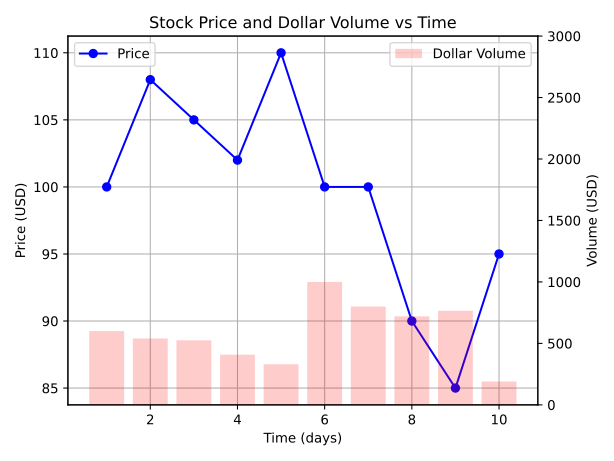
Modify your figure to use the twinx ()
Shared x-axis : Time (days)
Left y-axis : Price (USD) — plot as a blue line with circle markers
Right y-axis : Volume (USD) — plot as a red bar chart
Adjust the plot settings for visibility:
Set the bar chart’s transparency to 0.2 (20% opacity).
Set the y-axis limits for Volume to range from 0 to 3 times the maximum volume.
This ensures the bars stay in the bottom third of the graph.
Place the Price legend in the upper left and the Volume legend in the upper right.
Ensure that your plot matches the sample output below.
Note
In a shared figure, the title should be set for the entire figure. Axis-specific
settings such as labels, limits, and grid lines should be applied to the appropriate
axis.
When calculating the Volume, use list comprehension instead of a for loop using the
zip ()
Note
List comprehensions are a more “Pythonic” way to create lists and can often lead to
more concise and readable code. You can find examples of list comprehensions in the
official Python
tutorial
When complete, save the modified file as
py4_team_1_teamnumber.py and turn it in
with the remainder of the team task assignment files in Gradescope.
Sample Output
Fig. 14.2 Case__py4_pre_0_plot.svg