
Dec 04, 2025 | 1684 words | 17 min read
13.1.1. Task 1#
Learning Objectives#
Learn how a K-Nearest Neighbors (KNN) Classifier works and build one from scratch
Load a dataset and split it into training, validation, and testing sets
Understand what hyperparameters are and how to tune them using a validation set
Apply feature scaling (standardization) to improve model performance.
Task Instructions#
Save the flowcharts for each of your tasks in tp3_team_1_teamnumber.pdf. You will also need to include these flowcharts in your final report.
In this task, you’ll build a K-Nearest Neighbors (KNN) classifier. Your script will load a CSV dataset file that you created previously, split it into training, validation, and testing sets, and tune the model hyperparameters using the validation dataset. Remember to use the dataset containing the features you created in Section 12.2.3.
Note
For the functions described below, the order of arguments and outputs matters. Please ask TAs for guidance and explanation.
Step 1: Load Dataset Function#
Create a function named load_dataset
Arguments:
file_path (str): Path to the CSV file.
feature_cols (list of str): Names of columns to use as features
label_col (str): Name of the column containing binary labels (0 or 1)
shuffle (bool, default True): Whether to shuffle the data.
seed (int, default 42): Seed for reproducibility
Returns:
X: a NumPy array of features
y: a NumPy array of labels
The function must load the CSV file using pandas.read_csv(). Then, extract the feature columns (feature_cols) into
array X, and the label column (label_col) into array y. To convert extracted subsets of a Pandas DataFrame into a Numpy
array, you can use the .to_numpy() method. If shuffle is True, set the seed using np.random.seed(seed)
and generate a shuffled index using np.random.permutation(len(y)). You can use this shuffled index to reorder X and y.
Code Snippet: The code snippet below demonstrates how to load the dataset. (We are giving it away, but please understand what it does!)
def load_dataset(file_path, feature_cols, label_col, shuffle, seed=70):
 """
 Loads a dataset from a CSV file, separates features and labels,
 and optionally shuffles the data.
 """
 df = pd.read_csv(file_path)
 X = df[feature_cols].to_numpy()
 y = df[label_col].to_numpy()

 if shuffle:
     np.random.seed(seed)
     shuffled_indices = np.random.permutation(len(y))
     X = X[shuffled_indices]
     y = y[shuffled_indices]

 return X, y
Step 2: Train-Validation-Test Split Function#
Create a function named train_val_test_split that splits the data into an 80:10:10 ratio
for training, validation, and testing.
Arguments:
X (NumPy array): an array of image features
y (NumPy array): an array of image labels
train_ratio (float): a decimal value indicating the proportion of data for training (default=0.8)
val_ratio (float): a decimal value indicating the proportion of data for validation (default=0.1)
test_ratio (float): a decimal value indicating the proportion of data for testing (default=0.1)
Returns:
X_train: a NumPy array of training features
y_train: a NumPy array of training labels
X_val: a NumPy array of validation features
y_val: a NumPy array of validation labels
X_test: a NumPy array of testing features
y_test: a NumPy array of testing labels
This function should ensure that the three ratios sum up to 1. Use the ratios to allocate the rows of the features and labels. For example, if the default ratios are used, simply allocate the first 80% of X rows to X_train & he first 80% of y rows to y_train, the next 10% for validation, the final 10% for testing.
Note
Ensure you do not skip any rows and that the number of rows in train, validation, and test sum up to the number of rows in the original dataset.
Step 3: Feature Scaling Function#
Create a function named scale_features that scales the feature data for training, validation, and testing.
Arguments:
X_train (NumPy array): an array of training image features
X_val (NumPy array): an array of validation image features
X_test (NumPy array): an array of testing image features
Returns:
X_train_scaled (NumPy array): a scaled array of training image features
X_val_scaled (NumPy array): a scaled array of validation image features
X_test_scaled (NumPy array): a scaled array of testing image features
The function should calculate the mean and standard deviation of the columns in X_train. Use the mean and standard deviation to scale each column using the formula below:
X_train_scaled = (X_train - mean) / std_dev
Step 4: Metrics Function#
Create a function named calculate_metrics that evaluates your model’s prediction by returning the accuracy and error.
Arguments:
predicted_labels (NumPy array): a 1-dimensional array containing classId predictions
true_labels (NumPy array): a 1-dimensional array containing the actual classId
Returns:
accuracy (float): the proportion of correct predictions
error (float): the proportion of incorrect predictions
The function should compare the predicted labels to the true labels. Accuracy is the fraction of correct predictions. The error rate is 1 - accuracy
Step 5: KNN Individual Prediction#
Create a function named knn_single_prediction that predicts the class for a single data point given its features.
Arguments:
new_example (NumPy array): an array containing the features of a new example for which you want to predict the class
X_train (NumPy array): an array of training image features
y_train (NumPy array): an array of training image labels
k (int): the number of nearest neighbors
Returns:
predicted_label (int): 0 for stop sign, 1 for right turn
The function should calculate the Euclidean distance from the new_example to every example in X_train using np.linalg.norm(). Find the k training examples with the least distances (the “nearest neighbors”) from the new_example. Determine the most frequent label among those nearest neighbors (this is the “majority vote”). Return this label.
Note
We highly recommend asking a TA for help with this function as there are many ways to reduce the runtime of your code by making this function run efficiently.
Hints on sorting and keeping track of classes
Consider creating a list of distances containing tuples of (distance, ClassId) for each training image. The .sort() method can help you sort this array of tuples according to the distance.
You can then determine the prediction for the new example by selecting the majority class appearing in the first k elements of the sorted distances array.
Step 6: KNN Prediction Function#
Create a function named predict_labels_knn that predicts the class for every example in a given dataset of features.
Arguments:
X_new (NumPy array): The new dataset of image features for which you want to predict the class for each row
X_train (NumPy array): an array of training image features
y_train (NumPy array): an array of training image labels
k (int): the number of nearest neighbours
Returns:
predicted_labels (NumPy array): an array of predicted labels for the features in X_new
The function should iterate over the rows in X_new and use knn_single_prediction to get the predicted label of each row. Collect these predictions and return them as an array.
Step 7: Hyperparameter Tuning#
Create a function named tune_k_values that tests different k values with the validation set to determine the optimal k value to use.
Arguments:
k_values (list[int]): a list of k values
X_train (NumPy array): an array of training image features
y_train (NumPy array): an array of training image labels
X_val (NumPy array): an array of validation image features
y_val (NumPy array): an array of validation image labels
is_shuffle (bool): whether the dataset was shuffled or not
Returns:
best_k (int): the best value of k for the validation set
The function should iterate through each k in k_values. For each k, predict labels for both the training and validation sets and calculate their accuracy and error rates using predict_labels_knn and calculate_metrics. After the loop, call plot_knn_performance to visualize these metrics.
Return the k value that resulted in the highest validation accuracy. If two values of k both result in the highest validation accuracy, return the lesser one.
Note
For each value of k, append the metrics into a dictionary like this:
metrics = {
        "acc": {"train_acc": [], "val_acc": []},
        "error": {"train_error": [], "val_error": []}
    }
You will need to pass this dictionary to the plotting function in Step 8.
Hint
Once you get to this stage, you may realize that the hyperparameter tuning process is slow, just like the previous task in which you extracted features. This is because during hyperparameter tuning you are running the model for several k values.
Instead of recomputing the metrics every time you run your script, you could save the metrics into a CSV file. Then, in future runs, you can simply load this CSV file directly if it exists. You may find Pathlib useful for checking if a file exists.
This technique is called caching and you may find it useful for future tasks too. If you choose to implement caching (and save yourself time), you will find that you have different metrics for a shuffled dataset versus a non-shuffled dataset. So, make sure to include whether the dataset was shuffled or not in the cache filename using the is_shuffle argument.
Step 8: Plotting Function#
To visualize the tuning process, create a function named plot_knn_performance that plots the training and validation curves.
Arguments:
metrics (dict): See the note above
k_values (list[int]): the list of k values used to create the metrics dictionary
The function should create a figure with two side-by-side plots: (1) Accuracy vs k and (2) Error Rate vs k. Each plot should show separate lines for training and validation performance. Be sure to include titles, axis labels, and a legend. See the examples and match the formatting.
Code Snippet: Use the function below as a template.
def plot_knn_performance(metrics, k_values):
 """

 Produces a figure with two plots: Accuracy vs. k and Error Rate vs. k.
 """
 fig, axes = plt.subplots(1, 2, figsize=(15, 6))

 # Accuracy Plot
 axes[0].plot(k_values, metrics["acc"]["train_acc"])
 axes[0].plot(k_values, metrics["acc"]["val_acc"])

 # Error Rate Plot
 axes[1].plot(k_values, metrics["error"]["train_error"])
 axes[1].plot(k_values, metrics["error"]["val_error"])

 plt.tight_layout()
 plt.show()
Step 9: Main Function#
Create a main function that collects the following inputs from the user:
The path of the csv file containing the feature dataset
The choice for shuffling the dataset
The seed for shuffling the dataset (will be ignored if the user chooses not to shuffle)
The function should then:
Load the dataset and shuffle if needed using the function from Step 1: Load Dataset Function. You will need to pass in the feature column names and the label column. You can find the names of the column by viewing the feature dataset CSV file in a text editor or spreadsheet program.
Split the dataset into train, validation and test sets. A ‘set’ is a pair of
X(feature array) and correspondingy(the labels). You can use the function you created in Step 2: Train-Validation-Test Split Function.Scale the features ensuring that you use the same scaling factors as the training set for all 3 sets. Use the function you wrote for Step 3: Feature Scaling Function.
Display the sizes of the Training, Validation, and Test sets.
Use the function from Step 7: Hyperparameter Tuning to determine the best value of
kamong the following:
[1, 9, 20, 40, 80, 130, 200, 300, 500, 750, 1000]
Display the graphs showing how training and validation accuracy/error varies with the value of
k.
Bonus
Why do you think the training accuracy is 100% for k = 1?
Should we shuffle the dataset to measure the model’s performance? Why?
Calculate and display the final model performance on the test set using the previously determined optimal value of
k.
Save your program as tp3_team_1_teamnumber.py.
File Name |
Description |
|---|---|
Image feature dataset (from previous checkpoint) |
Sample Output#
Use the values in Table 13.3 below to test your program.
Case |
dataset |
shuffle |
seed |
|---|---|---|---|
1 |
img_features.csv |
no |
70 |
2 |
img_features.csv |
yes |
70 |
Ensure your program’s output matches the provided samples exactly. This includes all characters, white space, and punctuation. In the samples, user input is highlighted like this for clarity, but your program should not highlight user input in this way.
Case 1 Sample Output
$ python3 tp3_team_1_teamnumber.py Enter the path to the feature dataset: img_features.csv Shuffle the dataset? (yes/no): no Enter a seed for loading the dataset: 70
Data loaded and split into
Training set: size: 1175 Validation set: size: 147 Test set: size: 147
Based on the plots, the best k appears to be: 200
Evaluating final model on test set with k = 200...
--- Final Model Performance --- Test Set Accuracy: 0.6667 Test Set Error Rate: 0.3333
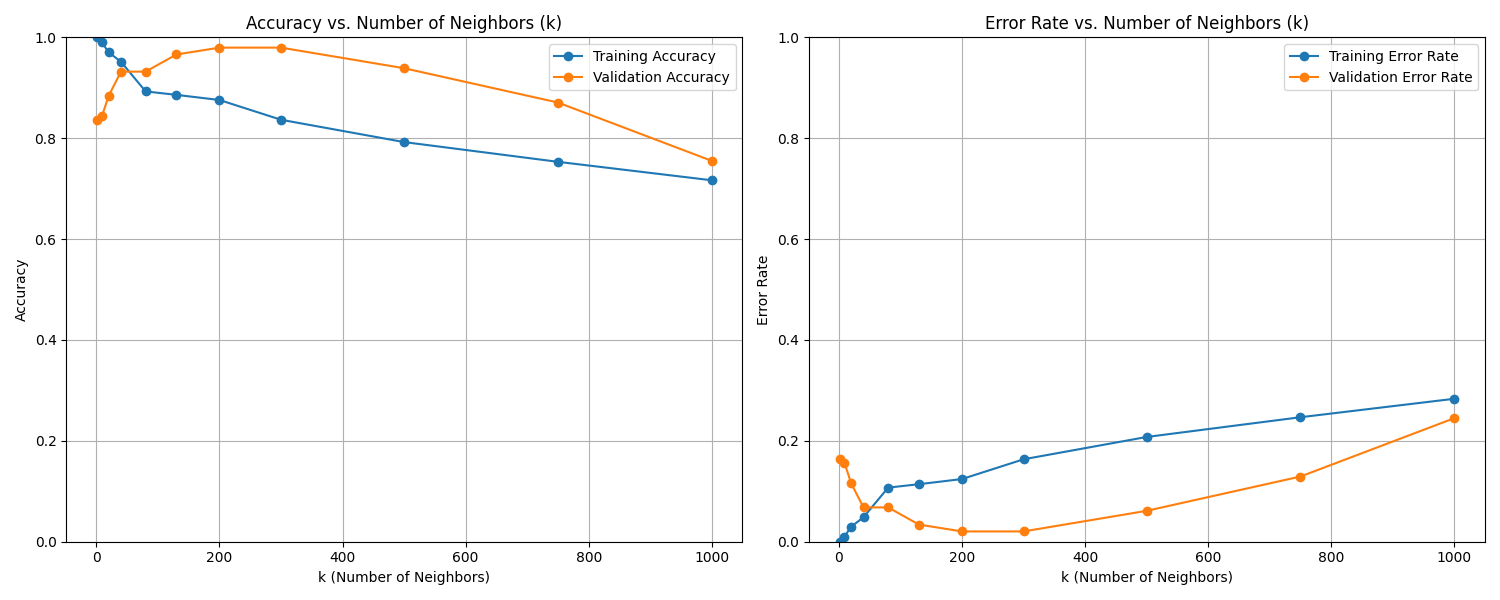
Fig. 13.1 Case_1_train_val.png#
Case 2 Sample Output
$ python3 tp3_team_1_teamnumber.py Enter the path to the feature dataset: img_features.csv Shuffle the dataset? (yes/no): yes Enter a seed for loading the dataset: 70
Data loaded and split into
Training set: size: 1175 Validation set: size: 147 Test set: size: 147
Based on the plots, the best k appears to be: 1
Evaluating final model on test set with k = 1...
--- Final Model Performance --- Test Set Accuracy: 0.9728 Test Set Error Rate: 0.0272
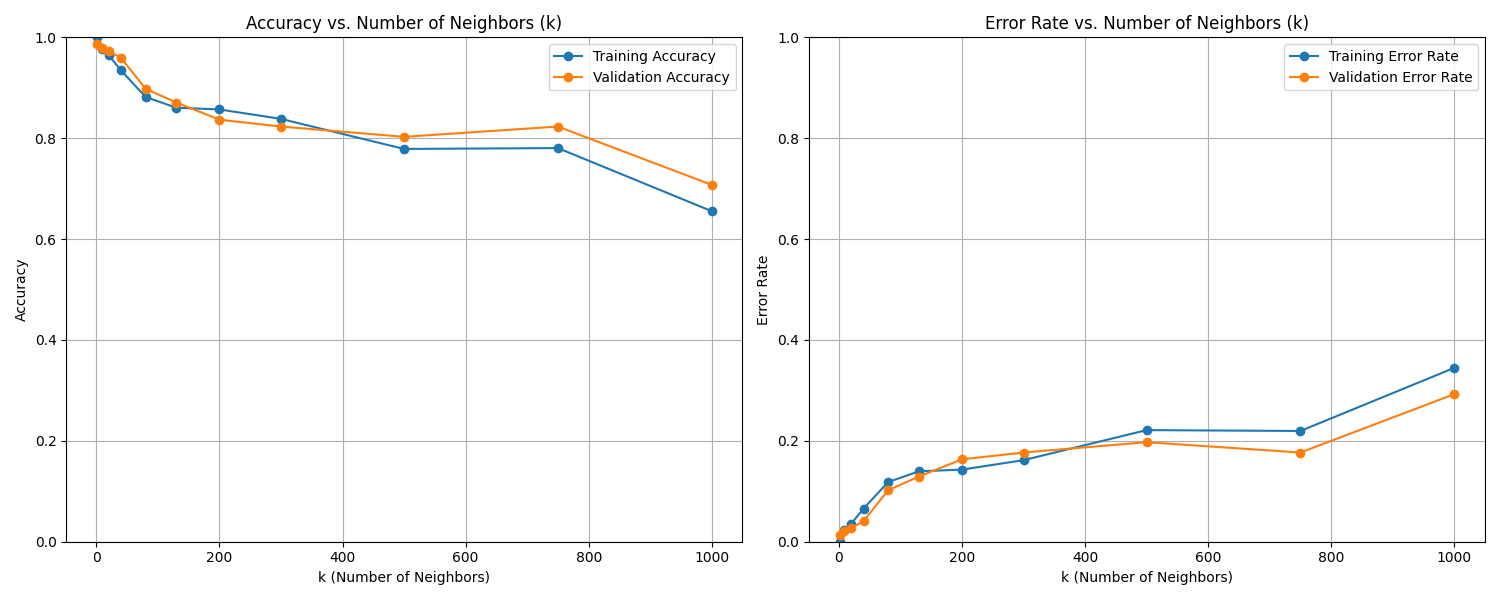
Fig. 13.2 Case_2_train_val.png#
Deliverables |
Description |
|---|---|
tp3_team_1_teamnumber.pdf |
Flowchart(s) for this task. |
tp3_team_1_teamnumber.py |
Your completed Python code. |