
Apr 28, 2026 | 1418 words | 14 min read
8.3. Demo Presentation - 25 points#
8.3.1. Task Instructions#
For the individual project, you will deliver a professional presentation and live demonstration of your project to a small group of peers in the course. In addition to presenting, you will also evaluate your peers’ presentations using a provided rubric.
Presentations will take place during class 16A (April 28th). You will be placed into groups with 5 other students (groups of 6 total) and will give your presentation during class. We will use Zoom to present the presentations so that they can be recorded and reviewed by the teaching team.
Each student will have 5 to 10 minutes to present, and presentations will be stopped if they exceed the 10-minute limit, so it is important to practice and manage your time carefully. Use the provided PowerPoint template to create a clear and professional presentation. Your audience will consist of fellow ENGR 13300 students who have a general engineering background but may not be familiar with your specific project topic, so be sure to tailor your explanations accordingly.
Please download the template ip_ind_presentation_username.pptx and save it
as ip_ind_demo_username.pdf.
Be sure to replace username with your Purdue username.
8.3.2. Presentation Requirements#
1. Background and Project Motivation (3 pts)#
Your presentation must include enough background information to ensure that a general engineering audience can fully understand your project, even if they have no prior experience with your specific topic. Begin by introducing the broader context of your project and clearly explaining any key terms, concepts, or processes that are necessary for understanding your work. Avoid assuming prior knowledge, and define or simplify technical language when needed. To support your explanation, incorporate relevant visuals such as images, diagrams, or flowcharts that help illustrate how your project works or the problem it addresses. In addition, you should clearly explain your motivation for choosing this project by answering questions such as: What interested you in this topic? What real-world problem or need does your project address? Why is this problem important? Finally, describe the significance and potential impact of your project by explaining how your solution could be used, who it benefits, and why it matters in a broader engineering or societal context.
2. New Concept (3 pts)#
As part of your project, you are required to incorporate at least one new concept, tool, or technique that has not been covered in class this semester. In your presentation, you must clearly introduce and explain this new concept in a way that demonstrates your understanding, not just its use. Begin by defining the concept and providing any necessary context so that your audience can follow along. Then, explain how the concept functions at a high level (e.g., how it works, what it does, or how it is typically used in engineering or programming). Next, describe specifically how you applied this concept within your project, including where it appears in your code or workflow and what role it plays in achieving your project’s goals. Finally, justify your choice by explaining why you selected this concept. What advantage it provides, how it improves your project, or why it was a good fit for solving your problem.
3. Code Demonstration (12 pts)#
You must include a live demonstration of your code by opening your program and running it in real time for the audience. During the demonstration, clearly explain what your program does and guide the audience through how a user would interact with it. This includes identifying all required user inputs (e.g., keyboard input, file input, parameters) and explaining how those inputs affect the program’s behavior. Walk through at least one complete example, so the audience can see the full process from input to output. As your program runs, clearly point out and interpret the outputs, explaining what they mean and how they relate to your project’s goals. If applicable, highlight key features, edge cases, or interesting behaviors of your program. Make sure your screen is easy to read (e.g., large font, zoomed-in view), and narrate your actions as you go, so the audience can follow along. Your program should be fully functional and prepared ahead of time to ensure a smooth demonstration.
4. Conclusion (2 pts)#
Conclude your presentation with a thoughtful reflection on your experience developing this program. Go beyond a simple summary by discussing what you found most interesting, surprising, or challenging during the project. Describe specific skills, concepts, or problem-solving strategies you learned or improved, and explain how this project contributed to your growth as an engineering student. You should also reflect on any obstacles you encountered and how you addressed them. Finally, consider what you would do differently if you were to revisit this project. This might include improving your code structure, adding new features, selecting a different approach, or refining your user experience. If applicable, you may also briefly mention potential future improvements or extensions of your project to show deeper thinking about its continued development.
8.3.3. Presentation Rubric#
Criteria |
Fully Achieved |
Mostly Achieved |
Partially Achieved |
No Attempt |
|---|---|---|---|---|
Background and Project Motivation |
Provides clear, thorough background that is easy for a general audience to
understand. Explains the problem, context, and significance effectively.
Motivation is well-articulated, including personal interest and real-world impact.
Uses visuals (images/diagrams) to enhance understanding.
|
Provides some background, but explanations may lack clarity or depth. Problem
and motivation are mentioned but not fully developed. Limited or unclear visuals.
Audience understanding may be partial.
|
Background is minimal, unclear, or too technical for a general audience. Motivation
and problem are poorly explained or missing. No helpful visuals.
|
No background or motivation provided.
|
New Concept |
Clearly defines and explains a new concept not covered in class. Demonstrates
strong understanding of how it works. Effectively explains how it is used in the
project and justifies why it was chosen.
|
Identifies a new concept but explanation is somewhat unclear or lacks depth.
Connection to the project is present but not fully explained. Limited
justification.
|
Mentions a new concept but provides little to no explanation of how it works or how
it is used. Weak or missing justification.
|
No new concept included or does not meet requirement.
|
Code Demonstration |
Provides a clear, well-prepared live demonstration. Program runs successfully.
Thoroughly explains program purpose, user inputs, and outputs. Walks through a
complete example. Highlights key features and communicates clearly throughout.
Demo is easy to follow and visually readable.
|
Demonstration is partially complete or somewhat difficult to follow. Explains
inputs and outputs but may lack detail or clarity in some areas. Example is shown
but may be incomplete or rushed.
|
Demonstration is unclear, incomplete, or difficult to understand. Little
explanation of how the program works. Significant issues with execution.
|
No demonstration provided.
|
Conclusion and Reflection |
Provides a thoughtful and specific reflection. Clearly explains learning,
challenges, and future improvements. Demonstrates insight into personal growth and
project development.
|
Reflection is present but somewhat general or lacks depth. Mentions learning or
changes but with limited detail.
|
No reflection or extremely minimal response.
|
|
Overall Presentation |
Presentation is well-organized, clear, and engaging. Slides are professional,
visually effective, and easy to read. Speaker communicates confidently, maintains
appropriate pacing, and does not rely heavily on reading from slides. Stays within
time limits. Transitions between sections are smooth.
|
Presentation is generally clear and organized. Slides are readable but may be
slightly cluttered or inconsistent. Speaker communicates effectively with minor
reliance on notes or slides. Slight issues with pacing or timing.
|
Presentation lacks clear organization. Slides are difficult to read or poorly
designed. Speaker has difficulty communicating ideas clearly or relies heavily
on reading. Poor time management.
|
Presentation is unclear, incomplete, or not delivered. Significant issues with
communication, organization, and professionalism.
|
Peer Review Survey Link#
https://purdue.ca1.qualtrics.com/jfe/form/SV_b2Z3PMNOsp2GwPc
8.3.4. Presentation Group Zoom Links#
Group |
Zoom Link |
|---|---|
Group 1 |
|
Group 2 |
|
Group 3 |
|
Group 4 |
|
Group 5 |
|
Group 6 |
|
Group 7 |
Group |
Zoom Link |
|---|---|
Group 1 |
|
Group 2 |
|
Group 3 |
|
Group 4 |
|
Group 5 |
|
Group 6 |
|
Group 7 |
|
Group 8 |
|
Group 9 |
|
Group 10 |
|
Group 11 |
|
Group 12 |
|
Group 13 |
Group |
Zoom Link |
|---|---|
Group 1 |
|
Group 2 |
|
Group 3 |
|
Group 4 |
|
Group 5 |
|
Group 6 |
|
Group 7 |
|
Group 8 |
|
Group 9 |
|
Group 10 |
|
Group 11 |
|
Group 12 |
|
Group 13 |
|
Group 14 |
|
Group 15 |
How to log in to Zoom using your Purdue Zoom account#
Open Zoom and select SSO (single sign-on) from the login screen. You may need to log out of your personal Zoom account before you can log in using your Purdue account.
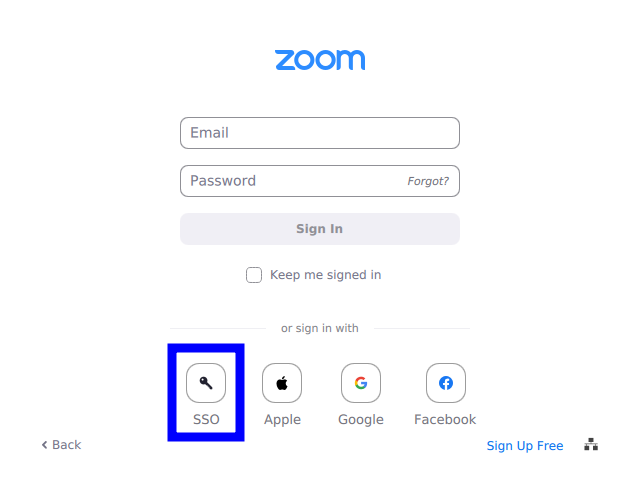
Fig. 8.1 Select SSO from the Zoom login screen.#
Enter
purdue-eduas the company domain and click Continue. Note the hyphen-, betweenpurdueandedu.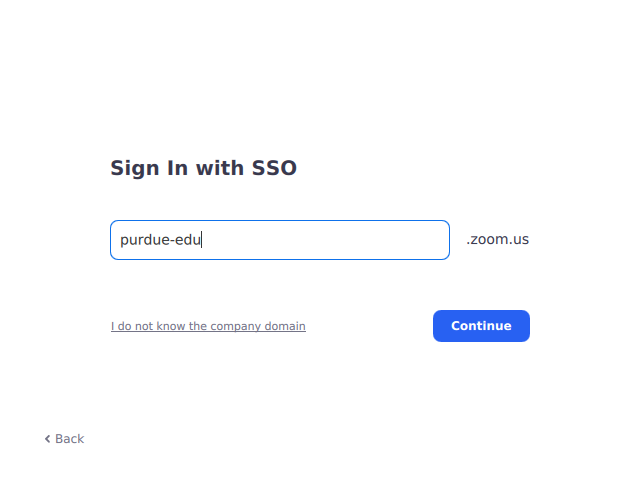
Fig. 8.2 Enter
purdue-eduas the company domain.#Log in with your Purdue credentials, and then you can use the link above to join the Zoom meeting.
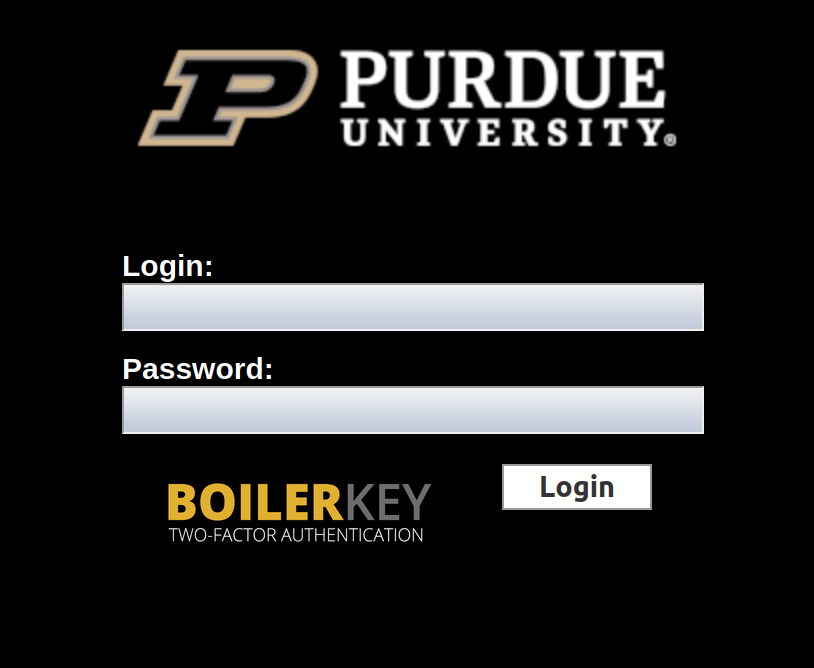
Fig. 8.3 Log in with your Purdue credentials.#
8.3.5. Deliverables#
Deliverables |
Description |
|---|---|
ip_ind_demo_username.pdf |
Your completed demo presentation in PDF format. |